[How Privacy Boost Works #5]: Private Payments From Your Safe Multisig
![[How Privacy Boost Works #5]: Private Payments From Your Safe Multisig](/_next/image?url=%2Fblog-safe-multisig.png&w=3840&q=75&dpl=dpl_9c5nntY1EedKHDxKaoj7Lj8FocWR)
Many teams manage their funds with a Safe. A typical setup requires two of three owners to sign before money moves. One person proposes a payment, another reviews it, and then it gets executed. The idea is simple: if one key leaks, the team's treasury doesn't go with it.
The catch is that every step lands onchain. Anyone who knows the Safe address can see who gets paid each month, how much, and which vendors the team works with. Payroll and vendor payments end up in plain view.
Moving the assets into a privacy protocol creates the opposite problem. In most privacy protocols, private assets are controlled by a single spending key. Two owners may have approved the deposit from the Safe, but after that, whoever holds the key can send funds alone. The reason the team chose a Safe in the first place is gone.
With Privacy Boost V2, teams can keep their Safe and still spend private assets. When Safe owners sign a regular Safe transaction, that signature becomes the approval for each individual private spend. This post walks through how that works, and what stays public and what stays private along the way.
1. Why privacy protocols and multisigs never fit well
In most ZK privacy protocols, a note (the unit of a private asset) is bound to a spending key. The key is built into the note's address, so whoever can sign with that key owns the note.
That design makes two things hard. Changing your key means moving every note you hold over to the new key. And an account without a key can't exist at all.
A Safe is exactly that kind of account. It's a contract with no private key of its own. It just collects and verifies its owners' signatures. So for a Safe to hold private assets, someone had to generate and hold a separate key, or the owners had to split a key into shares and set up a separate co-signing scheme.
2. AuthRegistry: notes go to accounts, keys go to a registry
Privacy Boost separated notes from signing keys from the start. Notes belong to an account. The authority to spend that account's assets is managed separately by an onchain registry called AuthRegistry.
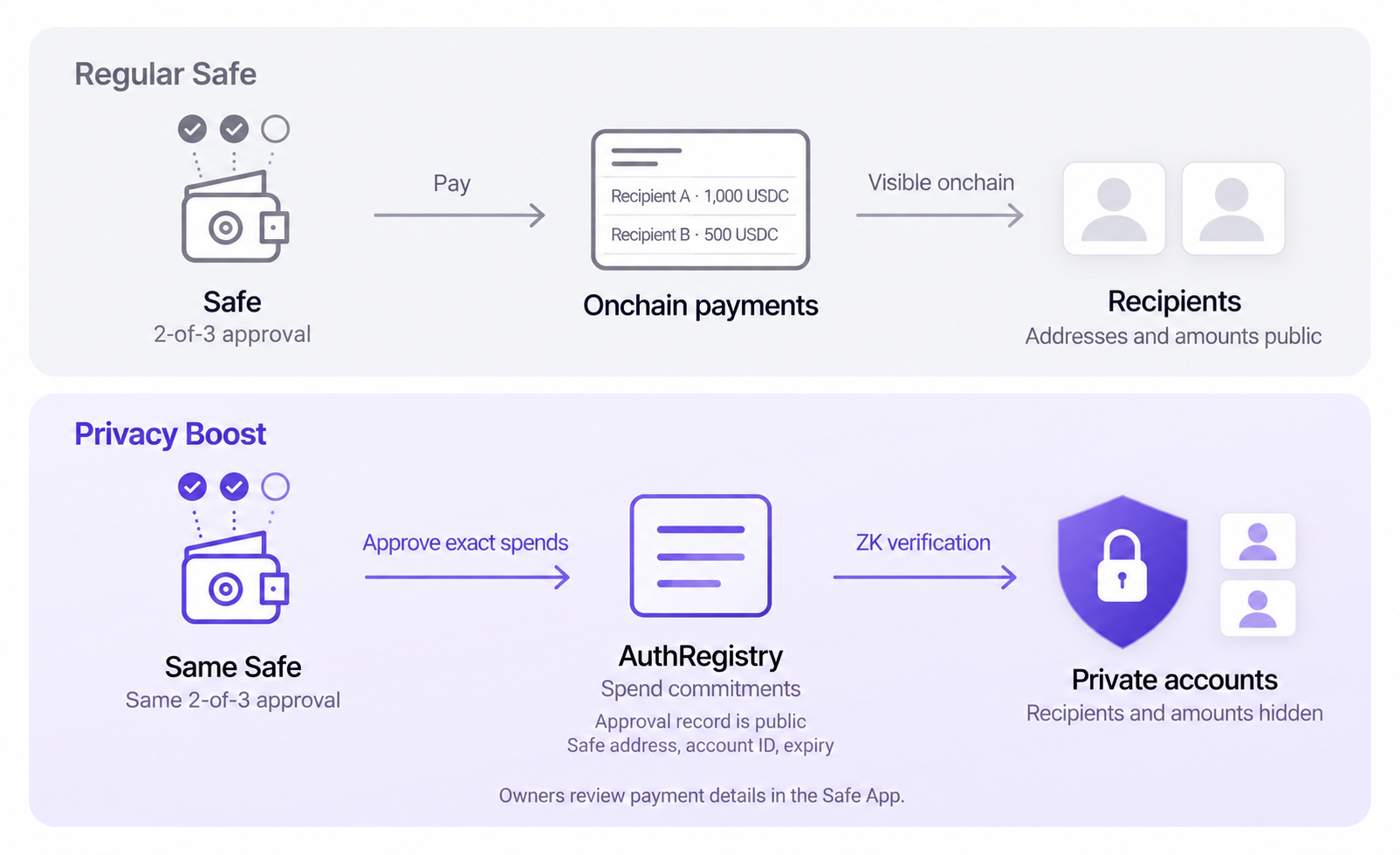
When the ZK circuit verifies a spend, it checks one of two things: whether the spend was signed with a key registered to the account, or whether the account's owner approved this exact spend in advance. Both paths use the same tree, so onchain there's no way to tell which one authorized a given spend.
You can call this "Account Abstraction for private accounts". It's about how Privacy Boost splits accounts from the authority to spend. Once spending authority is no longer pinned to a single key, a few things become possible:
- Rotate or revoke keys without moving any notes.
- Register a different key on each device, and revoke just that key if a device is lost.
- Use existing wallets such as EOAs, smart accounts, and EIP-7702 accounts as the account owner.
- Let keyless contract wallets like Safe own an account.
The last one is what this article demonstrates.
3. What Safe owners sign: permission for one specific spend
An account owned by a Safe has no standing signing key. Whenever the team needs to send money, the Safe posts an approval to AuthRegistry that says "allow this one spend." Think of it as a one-time authority.
Here's how it works in practice:
- A team member creates the payment and adds it to the Safe queue. It's an ordinary Safe transaction that calls AuthRegistry's approval function.
- The other owners check the recipient, amount, and fee in the Safe App and sign. Once the threshold is met, it executes.
- On execution, the commitment for that spend is recorded in AuthRegistry.
- Privacy Boost includes the spend in the next epoch, and the ZK circuit checks that it matches the approved commitment. Nobody needs to sign again at this step.
A commitment is a hash of the spend details and a secret random value. The value alone reveals nothing about the payment, but changing the recipient or amount even slightly produces a completely different value. If the team approves sending 1,000 USDC to a contractor, the person who proposed it can't later swap in their own account as the recipient or bump the amount. The server that generates proofs can't change what was approved either. And since spent notes are blocked by nullifiers, the same approval can't pay out twice.
Nothing changes on the Safe side. There's no module or guard to install and no new signing scheme. The Safe's owner set, threshold, and transaction queue govern private assets the same way they govern everything else. The Safe App simply decodes the queued transaction into a readable list of payments and checks that the list matches the actual commitments. If the Safe has a module or guard enabled, the Safe App shows a warning, since a module can post approvals without going through the threshold.
MPC wallets work the same way. If an MPC wallet such as Fireblocks controls the account's owner address, its participants send the approval transaction with their usual threshold signing. Privacy Boost only checks whether the account owner posted the approval, so it doesn't matter whether that owner is a Safe or an MPC wallet.
4. A month of payroll in one approval
If a team pays 20 contractors every month, queuing 20 separate transactions and collecting signatures for each gets tedious fast. So approvals can be batched. A single Safe transaction can approve up to 256 spends, and each approved spend executes on its own.
Each of those 20 recipients and amounts is still approved individually. There's no way to grant broad permission like "pay out up to 20,000 USDC however you see fit." If even one payment in the batch fails verification, the Safe App rejects the whole batch.
Approvals expire after at most 30 days, and a batch can be revoked even after it has executed. Revocation takes about 10 minutes to kick in, because proofs built against the state just before the revocation are still accepted for a short window. Since revocation works per batch, it's a good idea to approve regular payroll and large one-off payments separately.
Funds don't get stuck if the Privacy Boost server goes down. Forced withdrawal uses the same approval mechanism, so Safe owners can approve a single withdrawal and pull assets straight from the contract without touching the server.
5. The approval is public. What was approved is not.
Pay 20 contractors from a regular Safe, and 20 recipient addresses and amounts sit onchain for anyone to read. Make the same payments through Privacy Boost, and outsiders see a single record showing that the Safe posted one approval batch. That record holds the Safe address, the account ID, 20 commitments, and an expiry time.
However, the commitments alone don't reveal who is getting paid or how much. When the spends execute, they enter an epoch through the same tree as every other spend, so nothing visibly ties them back to the Safe that approved them. For payments sent to private accounts, recipients and amounts stay private too. Owners can review each contractor's payment in the Safe App, while outsiders have no way to reconstruct that list.
6. Same Safe rules, private payments
Teams that run on a Safe already have an answer to "who can move the money": the owner set, the threshold, and the propose, review, execute routine. There's no reason to rebuild any of that for privacy.
With Privacy Boost V2, teams spend private assets with the same Safe, the same owners, and the same process. Owners review and sign payments as usual, and the outside world only sees that the Safe approved something. AuthRegistry's separation of notes and keys is what lets a Safe own a private account without holding a key.
Decisions about moving money are made together, and payment details are seen only by the people who need them. Teams have always needed both, and now they can have both onchain.
See Privacy Boost in action
Explore the privacy infrastructure behind confidential onchain finance.
Read next
Introducing Privacy Boost SDK for Morpho Integrators
The Privacy Boost SDK lets fintechs, neobanks, and wallets integrating Morpho give their users private deposits. Users keep earning on Morpho while their balances stay shielded from public view, through a drop-in, self-custodial integration.
Privacy Boost Powers Cloaked on Base
Cloaked is a self-custodial wallet bringing private balances and private transfers to Base. Privacy Boost is the privacy infrastructure powering them, so amounts and counterparties stay off the public ledger without giving up self-custody.